

Planning an office move with minimal downtime in New York City requires precise coordination between your landlord, IT team, staff, and a reliable commercial mover. Businesses that work with 5 Stars Movers NYC in New York, NY can align move dates, elevator windows, and crew schedules so operations in Manhattan, Brooklyn, Queens, the Bronx, and Staten Island stay as uninterrupted as possible. 5 Stars Movers NYC+25 Stars Movers NYC+2
In this guide you will see how to build a realistic timeline, structure an office relocation checklist, coordinate IT, and keep employees productive before, during, and after the move.
Why minimizing office move downtime matters
Minimizing office move downtime matters because every hour your team cannot serve customers, access systems, or work normally increases direct and indirect costs. When you plan early you can schedule the move in stages, keep core services online, and reduce the financial impact of the relocation.
Downtime during an office move affects:
- Revenue from paused operations or missed opportunities
- Client experience when phones or email are not fully available
- Employee productivity and morale
- Project deadlines and contractual obligations
Research from office relocation and continuity planners consistently stresses early planning, clear timelines, and structured checklists as the main ways to reduce disruption during business moves. fmcsa.dot.gov+2fmcsa.dot.gov+2
How do I plan an office move with minimal downtime?
You plan an office move with minimal downtime by starting early, building a detailed schedule, phasing work, and coordinating IT, movers, and building management around a structured, written timeline that everyone on the project team understands.
A practical framework looks like this:
- Set objectives and constraints
- Define acceptable downtime in hours, not vague terms.
- Confirm lease dates, construction timelines, and building rules.
- Form a move project team
- Include leadership, HR, IT, facilities, and a move coordinator.
- Assign clear roles and decision authority.
- Choose dates and book a mover
- Select preferred weekends or evenings that fit building access.
- Reserve a commercial mover and lock dates in writing. 5 Stars Movers NYC+1
- Create a phased move plan
- Decide which departments move in which phase.
- Keep customer facing and critical teams online as long as possible.
- Develop checklists and communication plans
- Build detailed task lists for departments and individuals.
- Communicate timelines repeatedly through email, meetings, and signage.
- Coordinate IT cutover and testing
- Plan network, phone, and application migrations with clear windows.
- Test systems before employees arrive in the new space.
- Rehearse and refine
- Walk through key steps with your mover and IT team.
- Adjust timing, staffing, and phasing when you see bottlenecks.
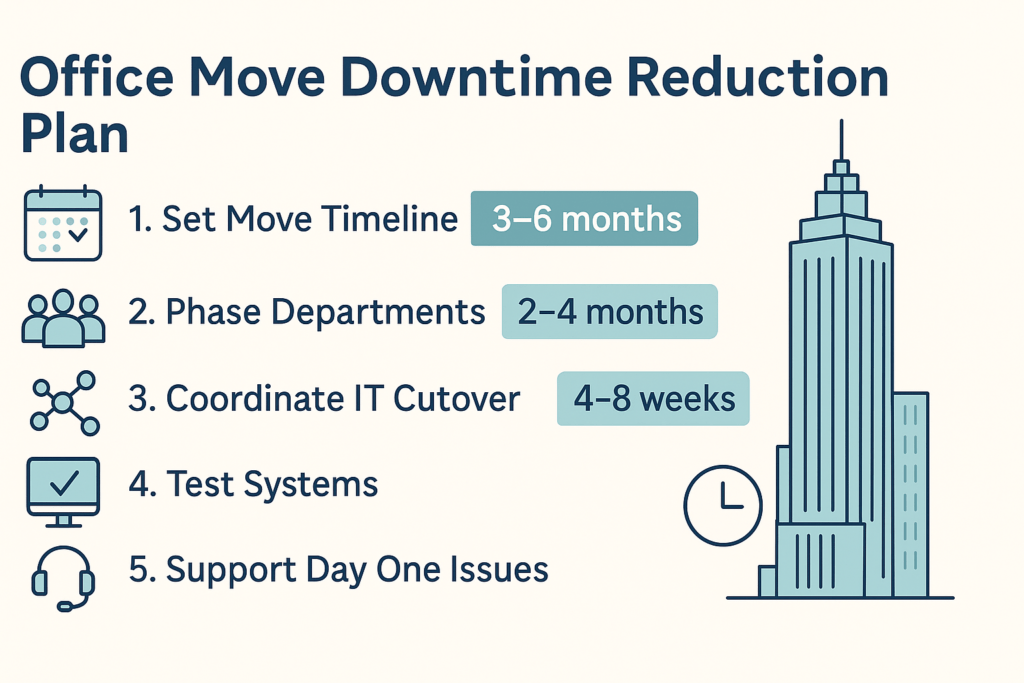
Building a realistic office relocation timeline
A realistic timeline works backward from your target move weekend and covers planning, packing, IT work, and post move stabilization.
Typical milestones:
- Three to six months before move
- Finalize lease and construction plan.
- Form project team and appoint a move coordinator.
- Shortlist commercial movers and request proposals.
- Two to four months before move
- Select a mover and lock in dates.
- Confirm elevator and loading dock rules at both locations.
- Finalize floor plans and furniture orders. WeWork+1
- Four to eight weeks before move
- Release department checklists and packing instructions.
- Schedule IT migrations and system freeze windows.
- Confirm certificates of insurance and building requirements.
- One to two weeks before move
- Stage crates, labels, and signage in the office.
- Validate new office readiness, including power and network.
- Confirm crew size, timing, and access with your mover.
- Move weekend
- Execute the move in phases.
- Complete IT cutover and core system tests.
- First week after move
- Run a post move checklist and fix open issues quickly.
When you document these milestones and share them with staff, you turn a large complex project into a sequence of manageable steps.
How long does an office move usually take?
Most office moves take from one weekend to several weeks depending on office size, number of phases, and construction status, but the actual hands on moving time is often concentrated into one or two long shifts that are tightly scheduled around elevator and loading dock access in NYC buildings.
Time drivers include:
- Square footage and number of employees
- Furniture systems and IT complexity
- Distance between old and new locations
- Building rules about night and weekend work
- Number of phases, such as pilot floor and rest of staff
Examples:
- Small professional office, under 3,000 square feet
- Packing over several weekdays
- Physical move often done in one evening or weekend day
- Medium office, 3,000 to 15,000 square feet
- Packing over one to two weeks
- Move often staged over one weekend with multiple crews
- Large or multi floor office
- Packing may start a month ahead
- Phased physical moves over multiple weekends or nights
Office move checklists from workplace and relocation experts frequently stress that preparation time is measured in months, while the actual move is measured in hours, so planning early is the main lever to reduce disruption. fmcsa.dot.gov+2fmcsa.dot.gov+2
Preparing teams and departments for the move
Preparing teams for the move is central to minimizing downtime because department leaders help sequence tasks and keep essential services running. You reduce risk when every department knows its role, deadlines, and how to keep work going while packing and relocating.
Key actions:
- Assign a move champion in each department.
- Give departments tailored checklists and timelines.
- Decide which tasks can pause and which must continue.
- Ensure customer facing functions have backup coverage.
Engage HR and communications staff so messages to employees are consistent and timed around key decision points like lease signing, date selection, and new office readiness.
What should be on an office relocation checklist?
An office relocation checklist should include governance, communications, IT, facilities, packing, move day operations, and post move follow ups, broken down into clear tasks with owners and due dates so no critical step is missed.
Core sections to include:
- Project setup
- Define budget, scope, and success measures.
- Assign project sponsor and move coordinator.
- Real estate and construction
- Lease review and key dates.
- Fit out, permits, and inspections.
- IT and telecom
- Network design, circuits, and Wi Fi.
- Phone system, conferencing, and printers.
- Furniture and equipment
- Furniture inventory and new purchases.
- Specialty equipment like lab gear or servers.
- Packing and labeling
- Crates, boxes, labels, and color coding system.
- Department packing responsibilities and deadlines.
- Move day logistics
- Elevator and dock bookings.
- Security, access badges, and routes.
- Post move actions
- Issue resolution log.
- Old space decommissioning and cleaning.
You can adapt generic office move checklists from respected resources, such as FMCSA’s planning tools and business continuity worksheets from New York City agencies, to your own environment. fmcsa.dot.gov+2fmcsa.dot.gov+2
Packing, labeling, and staging strategies
Packing, labeling, and staging strategies reduce chaos and make move day efficient so crews spend time moving items, not searching for them.
Best practices:
- Use color coded labels for each department and floor.
- Label every crate and chair with name, department, and destination.
- Stage packed items close to exits but away from daily work paths.
- Pack heavy items in smaller boxes, lighter items in larger boxes.
- Create a “last off, first on” list for critical equipment and files.
Internal guidance from 5 Stars Movers NYC shows how detailed labeling and checklists help crews work faster in Manhattan buildings with tight loading docks and elevators. 5 Stars Movers NYC+1
How do I coordinate IT during an office move?
You coordinate IT during an office move by treating it as a dedicated workstream with its own timeline, budget, and risk register, then aligning that workstream with your mover’s schedule and building access windows so systems go offline and come back online in a planned, predictable way.
Steps to follow:
- Create an IT move inventory
- Servers, network equipment, and racks.
- User devices, printers, and conferencing gear.
- Map dependencies
- Identify systems that must stay online as long as possible.
- Understand external dependencies such as cloud providers and carriers.
- Set freeze windows and cutover plan
- Decide when changes to systems are paused before move.
- Define precise cutover steps and sequencing.
- Plan cabling and power in the new office
- Confirm patch panels, outlets, and Wi Fi coverage.
- Verify rack dimensions and cooling for server rooms.
- Coordinate with telecom and internet providers
- Order or move circuits early to avoid delays.
- Schedule provider work to align with move weekend.
Guidance from technology and workspace providers shows that IT teams need their own checklists and testing scripts to avoid surprises when staff arrive in the new space. WeWork
How do I coordinate IT during an office move?
You coordinate IT during an office move by assigning an IT lead, documenting every asset and dependency, agreeing on a cutover plan, and scheduling system shutdown and startup windows that align with the mover’s timeline and building access so critical services are offline for the shortest possible time.
When translating that into action:
- Document which systems are mission critical, important, or deferrable.
- Decide when each system will go offline and come back online.
- Build a step by step runbook for shutdown, transport, and startup.
- Make sure the mover understands which racks or devices have priority.
- Prepare rollback plans in case issues arise after cutover.
Encourage IT to use established resources, such as security and continuity guidance from federal and local agencies, when planning backup and recovery for servers and data. fmcsa.dot.gov+1
Move day execution and contingency plans
Move day execution and contingency planning reduce downtime by turning the move into a scripted operation rather than an improvised event. Everyone, from movers and IT staff to department leads, should know where to be and what to do during each phase.
Elements of a good move day plan:
- Command structure
- A central coordinator and clear escalation paths.
- Contact list for movers, building staff, IT, and leadership.
- Phased loading and unloading
- Sequence floors and departments to match elevator capacity.
- Align “last out” items in the old office with “first in” zones at the new office.
- Real time tracking
- Use checklists or simple dashboards to track progress.
- Document any issues that require follow up.
- Safety and compliance
- Confirm clear access routes and safe lifting practices.
- Provide PPE where required by building or safety rules.
Guides from FMCSA emphasize that even local moves benefit from written plans, clear contracts, and documented inventories that both parties sign off on before and after the move. fmcsa.dot.gov+2fmcsa.dot.gov+2
How do I keep employees productive during a move?
You keep employees productive during a move by staging work so teams have clear tasks before packing, remote or alternative work options on move day, and a rapid return to normal operations through early system testing, clear communication, and quick issue resolution.
Tactics include:
- Pre move
- Assign sorting and digitizing tasks to clear paper and clutter.
- Encourage completion of pending work before system freeze windows.
- During move
- Allow remote work where roles permit.
- Keep a small “operations cell” active for urgent client needs.
- Post move
- Provide clear instructions on new desk locations, Wi Fi, and printers.
- Staff a temporary “floor support” team to help with issues.
Beyond efficiency, this approach reduces stress and helps employees feel in control of their work, which relocation and HR research links to better outcomes during large organizational changes. New York City Government+1
Post move checklist and productivity recovery
A post move checklist closes gaps and stabilizes operations quickly.
Key items:
- Verify that all critical systems function as expected.
- Confirm phones, conferencing, and printers in shared spaces.
- Resolve open issues logged during move weekend.
- Remove remaining crates and packing materials.
- Update address details with clients, vendors, and regulators.
You can adapt general business continuity checklists from NYC agencies to your post move needs so you capture issues that might affect operations during future events as well. New York City Government
NYC office move downtime FAQs for decision makers
Q: What is considered acceptable downtime for an office move?
A: Acceptable downtime for an office move is usually measured in hours rather than days and many NYC companies target one main weekend with only a few hours of limited service for phones or internal systems during cutover.
Q: How early should we start planning a low downtime office move?
A: Planning should begin at least three to six months before the move for medium or large offices and at least six to eight weeks ahead for smaller teams so lease, construction, IT work, and mover dates can be aligned properly. fmcsa.dot.gov+2fmcsa.dot.gov+2
Q: Who should be on the office move project team?
A: The project team usually includes a sponsor from leadership, a move coordinator, representatives from IT, facilities, HR, finance, and key departments that face clients or manage core operations.
Q: How do we test systems before employees return to the office?
A: Before staff return, IT should run a scripted set of tests for connectivity, core applications, voice, printing, and conferencing using actual user accounts so issues are found and fixed while the office is still relatively quiet.
Q: What metrics should we track after an office move?
A: Common metrics include support tickets related to the move, hours of system downtime, number of missing or damaged items, and feedback from employees and clients about the transition, which help improve future relocations.
Q: How can small businesses manage a move with a limited budget?<br>
A: Small businesses can manage on a limited budget by decluttering heavily, doing some packing in house, using moving labor help for specific tasks, and scheduling moves at off peak times where practical while still complying with building rules. 5 Stars Movers NYC+25 Stars Movers NYC+2
Q: What safety considerations apply during an office relocation?
A: Safety considerations include proper lifting techniques, clear walkways, secure stacking of boxes, and adherence to building and fire regulations, which align with established workplace safety principles for manual handling and emergency access. New York City Government
Plan your NYC office move timeline with low downtime support
Once you understand how to plan an office move with minimal downtime, the next step is to turn that knowledge into a specific schedule for your business in Manhattan, the East Village, Alphabet City, NoHo, and nearby neighborhoods that 5 Stars Movers NYC serves across the city. 5 Stars Movers NYC+25 Stars Movers NYC+2
To move from planning to execution:
- Map lease, construction, and IT milestones on a single timeline.
- Decide which departments will move in which phase.
- Request detailed commercial moving proposals that explain crews, hours, and scope.
- Use internal checklists and FMCSA planning tools to structure your move. fmcsa.dot.gov+2fmcsa.dot.gov+2
- Confirm elevator and loading dock access at both buildings.
You can begin by reviewing the commercial moving services in NYC and combining them with targeted moving labor help in New York City or long distance movers if your relocation includes out of state offices or storage. 5 Stars Movers NYC+25 Stars Movers NYC+2
A structured plan, backed by proven resources and a mover familiar with NYC buildings, lets you relocate with predictable downtime instead of last minute scrambling, so your teams can stay focused on clients and growth rather than logistics.
Plan Your NYC Move
Explore our Commercial Moving NYC, see our NYC service areas, or request a free quote. You can also visit the 5 Stars Movers NYC home page for more tips.
